ZOO Module API
The ZOO Module is implemented with the plg_jbackend_zoo plugin. It provides functions related to ZOO extension (applications, categories and items). Here is the list of supported methods.
Get the list of categories
Request parameters
action=get
module=zoo
resource=categories
app=<app id>
Example
<end-point>?action=get&module=zoo&resource=categories&app=<A>
Example (REST format)
<end-point>/get/zoo/categories?app=<A>
Response
{
    "status": "ok",
    "total": <T>,
    "categories": [
        {
            "id": "<category id>",
            "name": "<category name>",
            "alias": "<category alias>",
            "description": "<description>",
            "parent": "<parent id>"
        },
        ...
        {
            "id": "<category id>",
            "name": "<category name>",
            "alias": "<category alias>",
            "description": "<description>",
            "parent": "<parent id>"
        }
]}
Get a category
Request parameters
action=get
module=zoo
resource=categories
id=<N>
app=<app id>
Example
<end-point>?action=get&module=zoo&resource=categories&id=<N>&app=<A>
Example (REST format)
<end-point>/get/zoo/categories/<N>?app=<A>
Response
{
    "status": "ok",
    "id": "<category id>",
    "name": "<category name>",
    "alias": "<category alias>",
    "description": "<category description>",
    "application_id": "<application id>",
    "parent": "<parent id>",
    "ordering": "<ordering>",
    "content_subtitle": "<content subtitle>",
    "content_image": "<content image>",
    "content_image_width": "<content image width>",
    "content_image_height": "<content image height>",
    "metadata_title": "<meta title>",
    "metadata_description": "<meta description>",
    "metadata_keywords": "<meta keywords>",
    "metadata_robots": "<meta robots>",
    "metadata_author": "<meta author>"
}
Get the list of items
Request parameters
action=get
module=zoo
resource=items
category=<C>
limit=<L> (optional)
page=<P> (optional)
app=<app id>
Example
<end-point>?action=get&module=zoo&resource=items&category=<C>&app=<A>
Example (REST format)
<end-point>/get/zoo/items?category=<C>&app=<A>
Response
{
    "status": "ok",
    "total": <T>,
    "limit": <L>,
    "page": <P>,
    "items": [
        {
            "id": "<item id>",
            "name": "<item name>",
            "alias": "<item alias>",
            "created": "<created date>",
            "created_by": "<created by id>",
            "modified": "<modified date>",
            "modified_by": "<modified by id>",
            "publish_up": "<publish up date>",
            "publish_down": "<publish down date>"
        },
        ...
        {
            "id": "<item id>",
            "name": "<item name>",
            "alias": "<item alias>",
            "created": "<created date>",
            "created_by": "<created by id>",
            "modified": "<modified date>",
            "modified_by": "<modified by id>",
            "publish_up": "<publish up date>",
            "publish_down": "<publish down date>"
        }
    ]
}
Notes
Created and modified date format is YYYY-MM-DD HH:MM:SS
Get an item
Request parameters
action=get
module=zoo
resource=items
id=<N>
app=<app id>
Example
<end-point>?action=get&module=zoo&resource=items&id=<N>&app=<A>
Example (REST format)
<end-point>/get/zoo/items/<N>=?app=<A>
Response
{
    "status": "ok",
    "id": "<item id>",
    "name": "<item name>",
    "alias": "<item alias>",
    "application_id": "<application id>",
    "type": "<item type>",
    "created": "<created date>",
    "created_by": "<created by id>",
    "modified": "<modified date>",
    "modified_by": "<modified by id>",
    "publish_up": "<publish up date>",
    "publish_down": "<publish down date>",
    "priority": "<item priority>",
    "state": "<item state>",
    "searchable": "<is searchable>",
    "access": "<item access>",
    "hits": <item hits>,
    "metadata_title": "<meta title>",
    "metadata_description": "<meta description>",
    "metadata_keywords": "<meta keywords>",
    "metadata_robots": "<meta robots>",
    "metadata_author": "<meta author>",
    "enable_comments": "<enable comments>",
    "primary_category": "<primary category id>",
    "elements": {
        "<element 1 id>": {
            "identifier": "<element 1 id>",
            "type": "<element type>",
            "data": {
                "<field 1 name>": "<field 1 value>",
                ...
                "<field M name>": "<field M value>"
            }
        },
        ...
        "<element N id>": {
            "identifier": "<element N id>",
            "type": "<element type>",
            "data": {
                "<field 1 name>": "<field 1 value>",
                ...
                "<field L name>": "<field L value>"
            }
        },
    }
}
Notes
Created and modified date format is YYYY-MM-DD HH:MM:SS
When option Identify elements is set to No, the elements structure is different:
    "elements": [
        {
            "identifier": "<element 1 id>",
            "type": "image",
            "data": {
                "<field 1 name>": "<field 1 value>",
                ...
                "<field M name>": "<field M value>"
            }
        },
        {
            "identifier": "<element N id>",
            "type": "textarea",
            "data": {
                "<field 1 name>": "<field 1 value>",
                ...
                "<field L name>": "<field L value>"
            }
        }
    ]
Plugin Settings
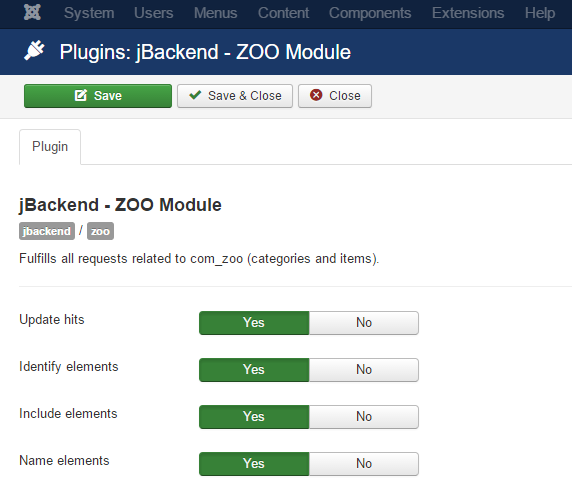
The following options are available for user plugin:
| Option | Description |
|---|---|
| Update hits | Update hits counter for each request. |
| Identify elements | Use field identifier as key to build the elements in the response. |
| Include elements | Include elements data in the list of items. |
| Name elements | Use a slug name for elements (in lowercase without blanks). |