Push Module API
The Push Module is implemented with the plg_jbackend_push plugin. It provides functions related to mobile push notifications for iOS and Android. Here is the list of supported methods.
Register
The register function must be called by mobile apps each time they get a notification token from the push service (e.g. APNs or FCM) to register the device on jBackend. Registration is needed to send push notifications to the app on the registered device.
Request parameters
action=put
module=push
resource=register
token=<token>
appcode=<appcode>
platform=<platform>
user_id=<user_id> (optional)
user_email=<user_email> (optional)
ios_alert=<true or 1> (optional)
ios_badge=<true or 1> (optional)
ios_sound=<true or 1> (optional)
Example
<end-point>?action=put&module=push&resource=register&token=<token>&appcode=<appcode>&platform=ios
Example (REST format)
<end-point>/put/push/register?token=<token>&appcode=<appcode>&platform=android
Response
{
    "status": "ok",
    "token": "<token>",
    "appcode": "<appcode>",
    "platform": "<generic|android|ios>",
    "platform_code": <platform_code>,
    "app_id": "<app_id>",
    "device_id": <device_id>,
    "ios_alert": <0|1>,
    "ios_badge": <0|1>,
    "ios_sound": <0|1>
}
Notes
Supported platform codes are 0=Generic, 1=Android, 2=iOS.
It is possible to associate an existing Joomla user to the device with the user_id param. If the plugin option Require user email is enabled, it is also needed to include the user_email field, and the email must match with the registered email address for the user with the specified user_id.
On iOS platform the app can also send (optionally) its notification settings for alert (ios_alert), badge (ios_badge), and sound (ios_sound). These values can be used to filter target devices when sending push notifications from jBackend.
Scheduler
The scheduler function must be called on a regular basis (e.g. from a crontab) to trigger the sending of scheduled push notifications.
Request parameters
action=get
module=push
resource=scheduler
Example
<end-point>?action=get&module=push&resource=scheduler
Example (REST format)
<end-point>/get/push/scheduler
Response
{
    "status": "ok",
    "batch_size": <N>,
    "sent": <T>,
    "success": <S>,
    "failure": <F>
}
Notes
Sent is the total number of processed notifications.
Notifications
This function allows to create a push notification programmatically (i.e. add a notification to the queue).
Request parameters
action=post
module=push
resource=notifications
title=<title>
message=<message>
app_code=<app_code>
platform=<platform>
target=<target>
target_users=<target_users>
target_groups=<target_groups>
target_devices=<target_devices>
scheduled_time=<scheduled_time>
payload=<payload> (optional)
context=<context> (optional)
auth_token=<auth_token> (optional)
Example
<end-point>?action=post&module=push&resource=notifications&title=<title>&message=<message>&app_code=<code>&platform=1&target=0&scheduled_time=2016-11-13%2000:15:31
Example (REST format)
<end-point>/post/push/notifications?title=<title>&message=<message>&app_code=<code>&platform=1&target=0&scheduled_time=2016-11-13%2000:15:31
Response
{
    "status": "ok"
}
Notes
Supported platform codes are 0=Generic, 1=Android, 2=iOS.
Supported target codes are 0=All, 1=Selected users, 2=Selected groups, 3=Selected devices.
Params target_users, target_groups and target_devices are comma separated list of id.
Scheduled time format is YYYY-MM-DD HH:MM:SS (e.g. 2016-07-23 00:19:11).
Params payload and context can be a string or a json.
Plugin Settings
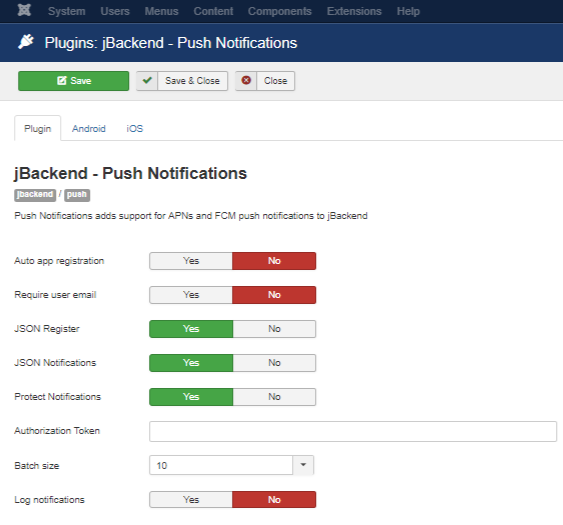
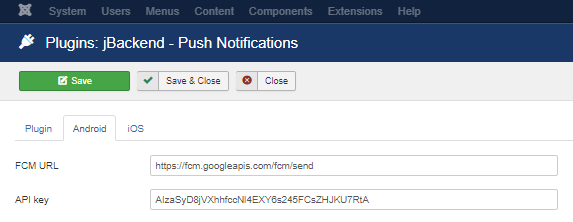
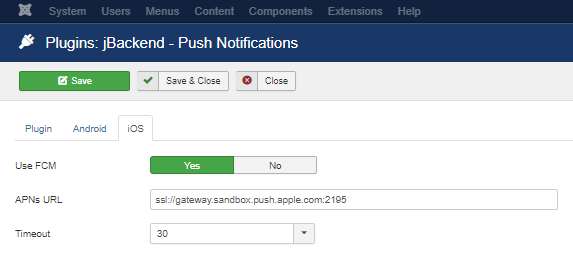
The following options are available for push plugin:
| Option | Description |
|---|---|
| Auto app registration | Allow automatic creation of new applications by code. |
| Require user email | Require the user email to add the user id when register a device (as a security measure). |
| JSON Register | Enable JSON payload on register action. |
| JSON Notifications | Enable JSON payload on add notification action. |
| Protect Notifications | Enable token protection on add notification action. |
| Authorization Token | The token that enables the add notification action. |
| Batch size | Number of push messages to send out each batch job. |
| Log notifications | Enable logging of all notifications in a dedicated database table (useful for analytics purposes). |
| FCM URL | URL of Firebase Cloud Messaging server. |
| API key | Google API key. |
| Use FCM | Use FCM to send push messages on iOS too. |
| APNs URL | URL of Apple APNs server. |
| Timeout | APNs connection timeout. |