Keys
To manage API Keys used to grant access to end-points go to menu Components > jBackend > Keys. A list of jBackend Keys will be shown:
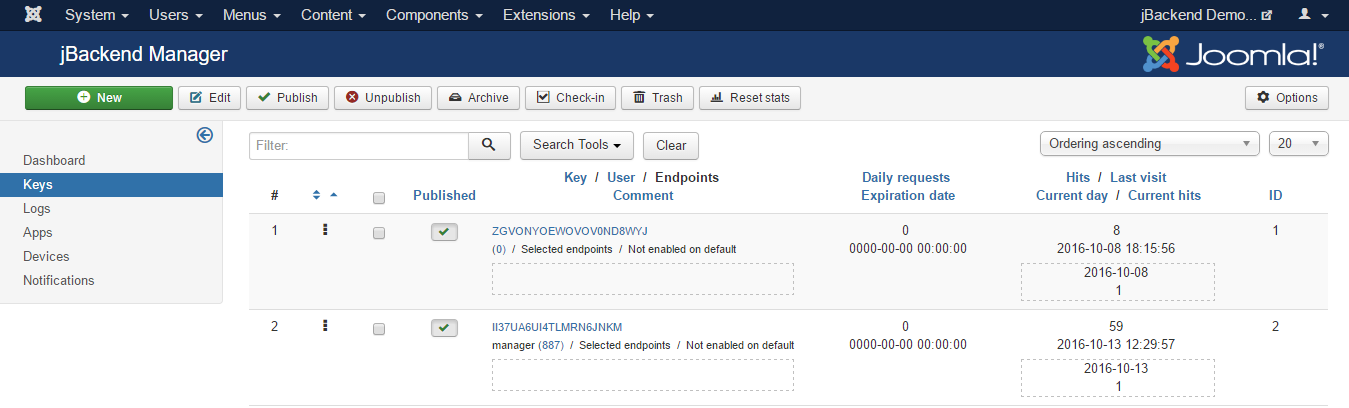
Each key has the following properties:
| Field: | Description: |
|---|---|
| Key | The enabling key |
| User | The user associated to this key (to restrict access with key and to a single user) |
| Enabled endpoints | If this key is enable on ALL endpoints or ONLY on selected endpoints |
| Selected endpoints | The endpoints for which the key is enabled, when not enabled for ALL |
| Enabled on default | If the key should also work on the default requests (i.e. /index.php?option=com_jbackend&view=request&...) |
| Daily requests | Maximum number of daily requests allowed for the key (0 means unlimited) |
| Expiration date | Key expiration date (0000-00-00 00:00:00 means never expires) |
| Comment | Just a reminder for the key |
For each key the following statistics fields are available:
| Field: | Description: |
|---|---|
| Hits | Number of times the key was used |
| Last visit | Last time the key was used |
| Current day | Current day for daily requests limit |
| Current hits | Hits of current day for daily requests limit |
The API key, when required by the endpoint, must be included in any request using one of the following methods:
- Adding api_key=<KEY> to the query params (for GET requests);
- Adding api_key=<KEY> to the payload (for POST requests);
- Adding api_key: <KEY> to the JSON payload (for JSON POST requests);
- Adding Authorization: api_key <KEY> to the headers (in any case).