User Module API
The User Module is implemented with the plg_jbackend_user plugin. It provides functions related to Joomla users and ACL. Here is the list of supported methods.
User login
Request parameters
action=post
module=user
resource=login
username=<username>
password=<password>
Example
<end-point>?action=post&module=user&resource=login&username=<username>&password=<password>
Example (REST format)
<end-point>/post/user/login?username=<username>&password=<password>
Response
{
    "status": "ok",
    "userid": <userid>,
    "username": "<username>",
    "session_id": "<session_id>"
}
To avoid to pass credentials in clear it is recommended to expose the endpoint over HTTPS, and to pass username and password as POST variables (it is supported out-of-the-box), or enabling JSON Login option and using a POST method with a JSON payload.
User logout
Request parameters
action=get
module=user
resource=logout
Example
<end-point>?action=get&module=user&resource=logout
Example (REST format)
<end-point>/get/user/logout
Response
{
    "status": "ok"
}
User registration
Request parameters
action=post
module=user
resource=register
username=<username>
password=<password>
email=<email>
firstname=<firstname>
lastname=<lastname>
Example
<end-point>?action=post&module=user&resource=register&username=<username>&password=<password>&email=<email>&firstname=<firstname>&lastname=<lastname>
Example (REST format)
<end-point>/post/user/register?username=<username>&password=<password>&email=<email>&firstname=<firstname>&lastname=<lastname>
Response
{
    "status": "ok"
}
To avoid to pass sensible data in clear it is recommended to expose the endpoint over HTTPS, and to pass variables using POST method (it is supported out-of-the-box), or enabling JSON Register option and using a POST method with a JSON payload.
User remind
Sends an email to the user's account with a password remind link.
Request parameters
action=get
module=user
resource=remind
email=<email>
Example
<end-point>?action=get&module=user&resource=remind
Example (REST format)
<end-point>/get/user/remind
Response
{
    "status": "ok"
}
User reset
Sends an email to the user's account with a password reset link.
Request parameters
action=get
module=user
resource=reset
email=<email>
Example
<end-point>?action=get&module=user&resource=reset
Example (REST format)
<end-point>/get/user/reset
Response
{
    "status": "ok"
}
User profile
Request parameters
action=get
module=user
resource=profile
Example
<end-point>?action=get&module=user&resource=profile
Example (REST format)
<end-point>/get/user/profile
Response
{
    "status": "ok",
    "fields": [
        {
            "id": "<id>",
            "title": "<title>",
            "name": "<name>",
            "language": "<language>",
            "type": "<type>",
            "default_value": "<default value>",
            "context": "<context>",
            "group_id": "<group id>",
            "label": "<label>",
            "description": "<description>",
            "required": "<required>",
            "language_title": "<language title>",
            "language_image": "<language image>",
            "group_title": "<group title>",
            "value": "<value>",
            "rawvalue": "<raw value>"
        },
        ...
    ],
    "_errors": [<_errors>],
    "groups": {
        "<groupid>": "<groupid>"
        ...
    },
    "id": "<id>",
    "name": "<name>",
    "username": "<username>",
    "email": "<email>",
    "block": "<block>",
    "sendEmail": "<sendEmail>",
    "registerDate": "<registerDate>",
    "lastvisitDate": "<lastvisitDate>",
    "activation": "<activation>",
    "params": {
        "admin_style": "<admin_style>",
        "admin_language": "<admin_language>",
        "language": "<language>",
        "editor": "<editor>",
        "helpsite": "<helpsite>",
        "timezone": "<timezone>"
    },
    "lastResetTime": "<lastResetTime>",
    "resetCount": "<resetCount>",
    "otpKey": "<otpKey>",
    "otep": "<otep>",
    "requireReset": "<requireReset>",
    "tags": {
        "typeAlias": <typeAlias>,
        "tags": "<tags>"
    }
}
It is possible to filter fields in the response just specifying the field list in the Required fields option.
User profile update
Allows to update the user profile (user must be authenticated). The requests must use the POST method with a JSON payload.
Request parameters
action=put
module=user
resource=profile
Example
POST <end-point>?action=put&module=user&resource=profile
Example (REST format)
POST <end-point>/put/user/profile
JSON payload data:
{
    "name": "<name>",
    "username": "<username>",
    "password": "<password>",
    "email": "<email>",
    "profile": {
        "city": "<city>"
        ...
    },
    "com_fields": {
        "field-1": "<value 1>",
        "field-2": "<value 2>"
        ...
    }
}
Response
{
    "status": "ok"
}
It is possible to specify any supported field in the payload, but the following fields are mandatory for each request: name, username, password, email
User status
Allows to check the current status of the user (guest or logged in), and provides some additional information.
Request parameters
action=get
module=user
resource=status
Example
<end-point>?action=get&module=user&resource=status
Example (REST format)
<end-point>/get/user/status
Response
{
    "status": "ok",
    "is_guest": <0 or 1>,
    "user_id": "<user_id>",
    "session_id": "<session_id>",
    "session_expire": <session_expire>
}
Plugin Settings
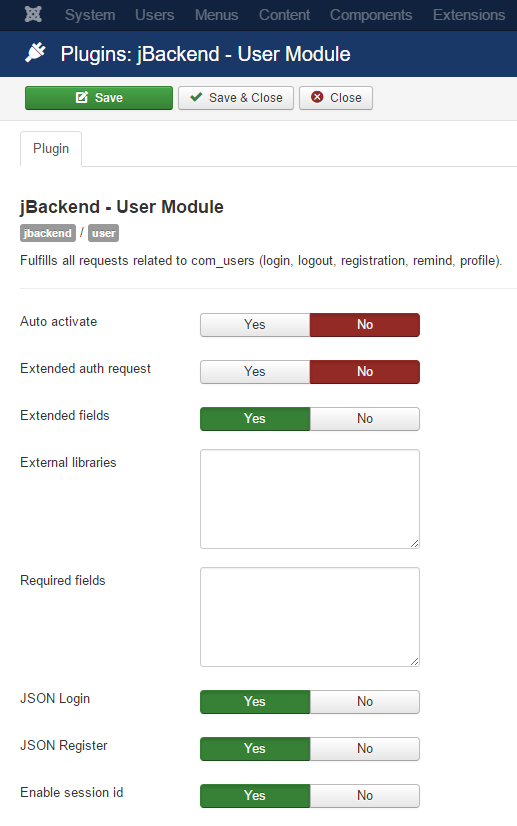
The following options are available for user plugin:
| Option | Description |
|---|---|
| Auto activate | Automatically activate users on registration and skip any notification email. |
| Extended auth request | Process register, remind and reset as an authentication request (i.e. these requests can bypass the access restrictions on the endpoint). |
| Extended fields | Enable support for additional fields in the registration. |
| External libraries | List of paths (relative to JPATH_SITE) of external libraries to load in the registration (one path each row). |
| Required fields | List of fields to include in the response for profile requests (when blank it returns all fields). Fields must be separated by commas and square brackets for nested fields (e.g. id,name,username,profile[city,region,country]). |
| JSON Login | Enable JSON payload on login action. |
| JSON Register | Enable JSON payload on register action. |
| Enable session id | When enabled it overrides cookie based session with session_id parameter. This is useful when it is not possible to rely on cookie based session. This parameter can be passed as GET/POST param or as JSON field when JSON payload is enabled for the current request. |