Pages 404
ReDJ allows to create a custom error page that can replace the Joomla standard one. To manage error pages go to menu "Components" -> "ReDJ" -> "Pages 404".

There are always two predefined pages as default, with titles "Italiano" (ID = 1) and "English" (ID = 2). These are example pages, added just to show how to create HTML for a custom error page. Specifically, these pages are identical to Joomla standard error page, except they add the email address of site Administrator, showing how to use supported macros.
BEWARE: do NOT customize these pages, because these are deleted and recreated on each ReDJ upgrade, so any changes will be lost. It’s better to add a new page (ID > 2) and use this.
For any custom error page the following fields are available:
Title
Text
The title to identify the custom error page.
Language Name
Text
The language identifier for the custom error page.
Page
Text
Insert HTML code of the custom error page. The following macros can be used:
- {siteurl} Site web address
- {sitename} Web site name
- {sitemail} Address used to send site mails
- {fromname} Name used to send site mails
- {errormessage} Description message of occurred error
- {article ID} Include an article (intro and fulltext). Replace "ID" with content item ID to include
Hits
Integer
Number of times the custom error page were used (i.e. returned to site visitors).
Last visit
Date
Last time the custom error page were used.
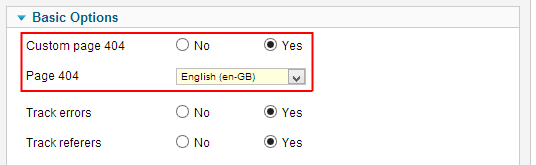
Once a custom error page was created, it can be enabled in ReDJ system plugin. Select menu "Extensions" -> "Plug-in Manager" and open plugin "System - ReDJ Community" or "System - ReDJ Enterprise". Under "Basic Options" set "Custom page 404" to yes and select the page to use from the drop-down list. See paragraph "Plugin settings" for more details.